Small, fast and independent · 1994–2007
There was a world beyond the browser war
The first browser war looks like a two-way contest in retrospect: Netscape versus Microsoft, Navigator versus Internet Explorer. Yet anyone who looked beyond the default—in a computer magazine, on a download site or on a Linux desktop—found a much richer choice. Some browsers were built for one operating system; others aimed above all to be smaller, faster or more adaptable.
Their market share remained modest, but their ideas were substantial. They showed that a browser was not a law of nature. Buttons could live elsewhere, several pages could fit inside one window, and users could decide whether images, formatting or advertising deserved scarce screen space.
Two Norwegians start again
In April 1994, Jon Stephenson von Tetzchner and Geir Ivarsøy began work on a research browser at Norwegian telecom company Telenor. The project was initially called MultiTorg. When they continued the work outside Telenor, Opera Software emerged. The first public Windows release arrived in 1996.
Opera took a different position from the free browsers supplied by large platform companies. It was sold as independent software. That forced its makers to offer a clear reason to choose it: a compact installation, fast controls, extensive settings and versions for a wide variety of systems.
A browser research project begins at Telenor in Norway.
The first public Windows version appears.
A free advertising-supported version lowers the threshold.
More customisation and a broader international rollout.
The new Presto engine takes over rendering.
Small was a design choice
On a slow PC and a dial-up connection, every second counted. Opera presented itself as small and fast, but compactness meant more than a download with few megabytes. It gave users direct control over what loaded. Images could be switched off, pages could be zoomed and toolbars could be customised extensively.
It was not a miracle cure. Sites made only for Netscape or Internet Explorer could break in Opera. Choosing an alternative browser could therefore mean working faster while more often meeting a notice that your browser was unsupported.
A browser as a Swiss Army knife
Welcome to the Web
Three documents open inside one browser window.
Show images: automaticDone · 3 windows · 12.4 kBFree CSS reconstruction based on typical Opera features around 2001; not a copy of one historical screen.
Opera brought many tools together: browsing, bookmarks, downloads and later email and news feeds. Its early interface used a workspace in which several document windows could sit inside the main window. It was not exactly the modern row of tabs, but it made switching between pages much faster than hunting for separate windows.
Document windows and later tabs kept a session together.
A short movement could go back, close or open a new page.
Pages could adapt to the screen and reading preferences.
Open pages could return after the browser closed.
Free, but with a strip of advertising
Until 2000, Opera was mainly shareware: you could try it, but continued use was supposed to be paid for. Opera 5 for Windows changed the model. It was free to download, but displayed advertising in the interface. Registration removed the ad strip.
It was a striking compromise. The browser became more accessible, but the promise of a compact interface visibly clashed with a banner above the page. In 2005, advertising disappeared from the desktop browser. Opera remained free and had to distinguish itself entirely through features, speed and versions for other devices.
Konqueror merged the Web and files
On Linux, alternatives grew from a different starting point. KDE 2.0, released on 23 October 2000, introduced Konqueror as both a web browser and file manager. An internet address and a folder on the hard disk could open in the same kind of window. This suited the open-source idea of a desktop assembled from cooperating parts.
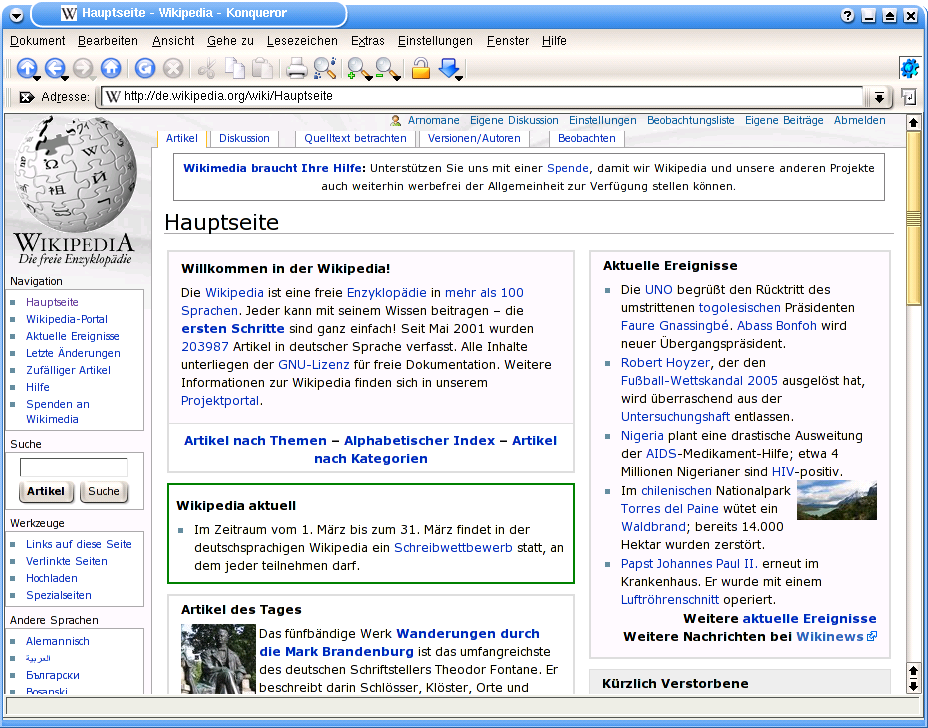
Konqueror's KHTML engine was small, open and technically influential. The browser itself never dominated the consumer market, but it showed that an independent web engine could emerge from a desktop community—not only from an American software company.
K-Meleon and iCab chose their own home turf
Not every alternative built everything itself. K-Meleon combined Mozilla's Gecko engine with a lightweight, highly customisable Windows interface. Users gained the web compatibility of the Mozilla project without the full Mozilla suite. On the Mac, iCab offered its own shareware browser from 1999, recognisable by its taxi icon and abundance of settings.
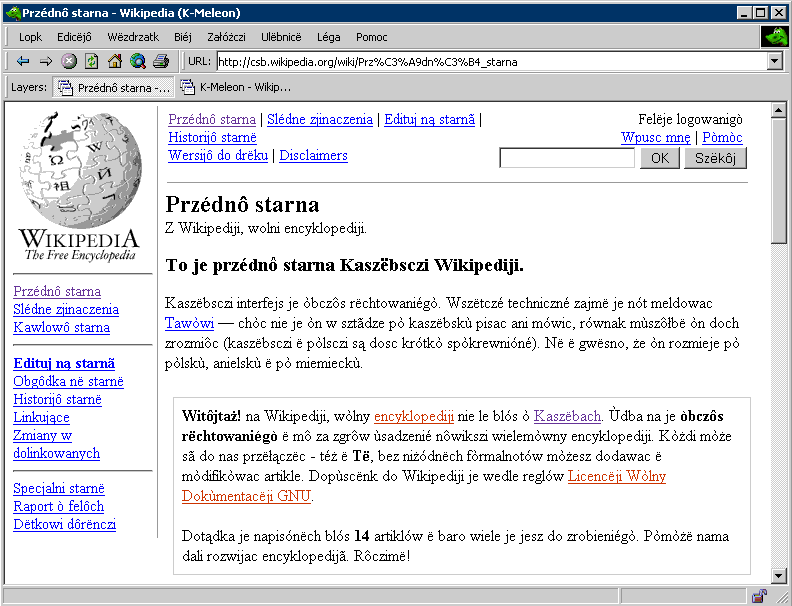
A light Windows shell around Gecko, focused on speed and customisation.
Shareware with many tools, extensive control and its own identity.
Browser and file manager inside one open desktop environment.
The engine underneath the window
These browsers made an important distinction visible: the browser window and the engine underneath are not the same. K-Meleon used Gecko, Konqueror used KHTML and Opera had its own Presto. The interface determined how you worked; the engine determined how HTML, CSS and scripts were interpreted.
That distinction later became decisive. New browsers could combine an existing engine with a different experience, while a small engine could unexpectedly become the basis for much larger products. Browser history is therefore not only a row of logos, but also a family tree of shared technology.
Not the winner, still the inventor
Opera and its contemporaries did not win the browser war. Yet they kept the market moving. They proved that users could ask for recoverable sessions, more pages in one window, zooming, mouse gestures and extensive customisation. Features that first seemed eccentric later became ordinary.
Their legacy is cultural too. Choosing a browser became a statement about what mattered to you: speed, open source, a familiar desktop or complete control. In the next chapter, that appetite for an open alternative reaches a much larger audience as Mozilla grows into Firefox.